

SIMPLIFIED CONTRIBUTION PLATFORM
SCHEDULING and “RECURRING” CONTRIBUTION REQUESTS
The SCP scheduling feature, originally intended for submitting contributions while out of the office or for payroll specific dates, has been expanded to allow contributions to be scheduled up to six months in advance. While SCP does not offer a true recurring contribution option currently, this scheduling process only requires about 5–10 minutes on a single date, with no need to log in again until the next scheduling cycle.
For detailed instructions on navigating SCP and submitting contribution requests, please refer to the SCP User Guide.
Key reminders:
- You may log in for each submission or schedule multiple contribution requests up to six months from the current date.
- SCP allows you to set reminders for when you need to return to enter the next set of scheduled contributions.
- Organizations are responsible for monitoring SCP activity. If an employee leaves, contribution amounts change, or banking details become invalid, you must log in and void any affected scheduled contributions.
Instructions for Scheduling Contribution Requests
- Log in: https://contribution.appiancloud.com/suite/ to display content under the My Requests tab.
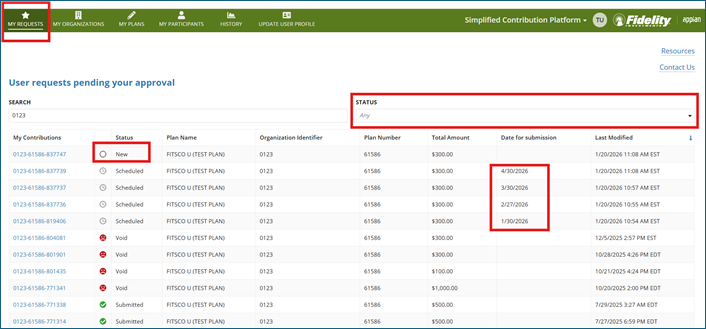
- Click the file link with the long blue number with the status of “New” on the My Requests page.
- Select “Create new contribution” in the upper right corner of your screen.
- Enter or review the amounts, ensure the bank details are correct, and select “I want to schedule this contribution request for a future date”
- Select the date SCP should post the contribution request, using the calendar provided:
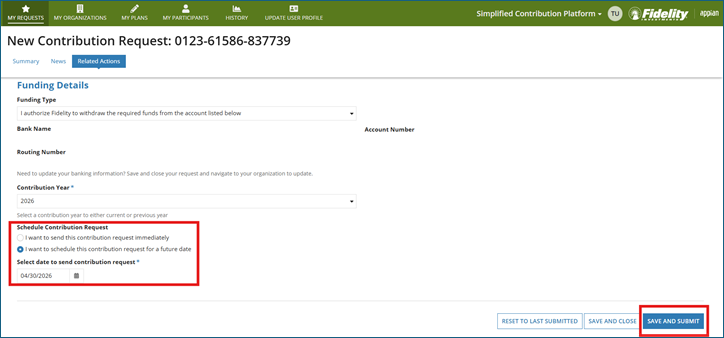
- Click “Save and Submit”, confirm the details are correct on the following page, and then click “Submit” again to complete the request.
- Click “End” to go back to the submitted request. Please note: Do not click “Reschedule” contribution request on this page. This will change the date of the submitted file and will not create a new file.
- To schedule another contribution request, click “My Requests” to start another request.
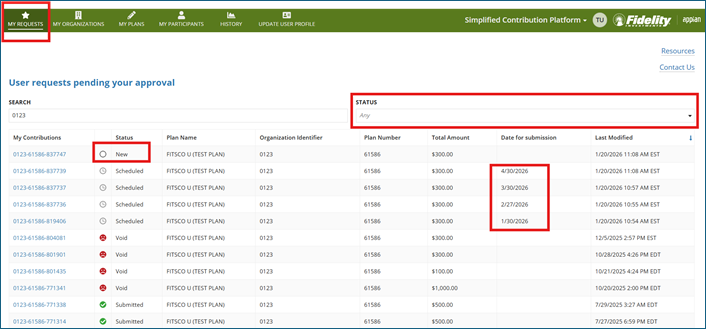
To view all scheduled and previous contribution requests, click ANY from the drop-down menu on the My Requests page. Note: Even though it is greyed out, it will allow you to select this first option on the list.
FAQ
Can I schedule requests beyond 6 months?
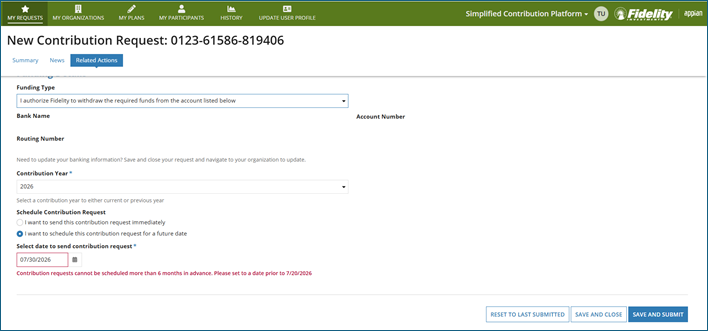
You may schedule your requests up to 6 months in the future. If you schedule a request outside of six months, a validation error will appear.
For example: “Contribution requests cannot be scheduled more than 6 months in advance. Please set to a date prior to 7/20/2026.” Please select a date within 6 months of the current date and click save and submit.
What if I entered a contribution incorrectly?
Contributions for same-day requests may be voided within 60 minutes after submission.
Scheduled contributions may be voided up to the scheduled date.
- If you do not see an option to void your request and it is before 4PM EST on the posting date, please call the Fidelity SCP team at 800-917-4369.
- If the request has already posted and a cancellation or correction is needed, please contact Geneva Benefits at 800-789-8765 or email benefits@genevabenefits.org.
Will you have a recurring option in the future?
We value your feedback and strive to improve the user experience. Our development team is working on an enhancement that will make recurring contribution requests an option to our clients. More to come!